EE-Sim Migration Guide
| Description | Migrate from EE-Sim to Power Studio Designer. Guides, feature mapping, and support for the EE-Sim sunset. |
| Author(s) | Analog Devices |
| Copyright | Copyright © 2026 Analog Devices Inc. All Rights Reserved. v0.2.7-dev-998da25 |
Migration Guide
EE-Sim Migration Guide
EE-Sim has been retired
As of July 15, 2026, EE-Sim is no longer available. All EE-Sim URLs now redirect to Power Studio Designer. Your supported designs have been imported — sign in and go to Library > My Designs to find them. Designs we can't import yet appear as Pending while we continue onboarding them.
Why is EE-Sim being retired?
EE-Sim is a third-party, vendor-hosted tool that has reached end-of-life. The vendor's shutdown of the platform accelerated the transition to Power Studio Designer, which was already the planned successor. Your existing designs have been preserved and are available in Power Studio Designer using the same MyAnalog account.
Power Studio Designer is ADI's next-generation, browser-based power design tool and the direct replacement for EE-Sim. It covers the same DC-DC power supply design workflows with several improvements.
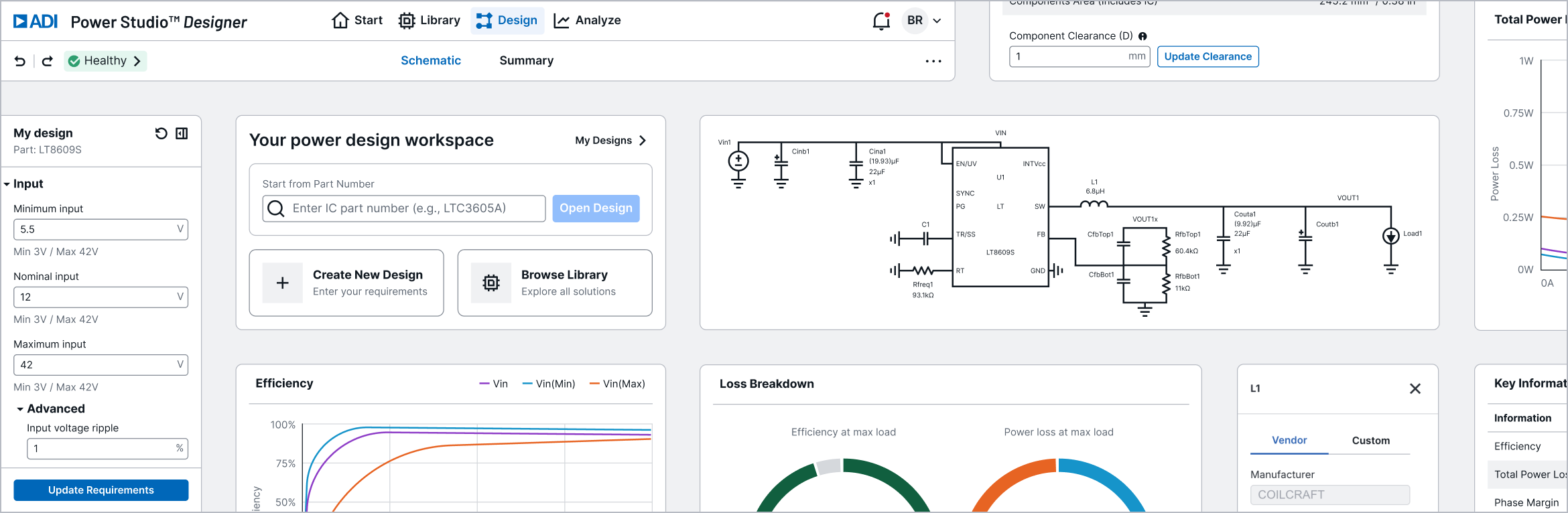
New to Power Studio Designer?
Watch the Getting Started video for a quick tour of the tool.
At a Glance
| EE-Sim | Power Studio Designer | |
|---|---|---|
| Platform | Browser + OASIS desktop app | Browser-based (export to OASIS/LTspice) |
| IC Coverage | 250+ Maxim ICs | 374+ solutions across unified Maxim and LT catalog |
| Design Entry | Enter requirements, tool generates schematic | Enter requirements, instant customized solutions matched to your search |
| Built-in Analysis | Run simulation (SIMPLIS), wait for results | Instant analytical results (no simulation run) |
| Offline Simulation | SIMPLIS/OASIS desktop | Export to LTspice or SIMPLIS/OASIS |
| Versioning | Track changes, compare versions | Save & restore version history |
| Account | MyAnalog (free) | MyAnalog or corporate SSO |
What's Improved
- 374+ solutions across a unified Maxim and LT catalog (vs EE-Sim's 250+ ICs)
- Instant analysis — no waiting for simulation runs; efficiency, loss, and loop stability are computed on demand
- Parametric sliders — sweep temperature (-40°C to 125°C) and input voltage with live chart updates
- Multi-Vin visualization — efficiency and loss charts plot Vin(Min), Vin(Nominal), and Vin(Max) simultaneously
- Component editing from analysis — click "Edit part" directly in the loss breakdown table
- Design health indicator — automated validation flags issues before you run analysis
What's Different
- Analytical engine for instant results — Power Studio Designer computes built-in results on demand and exports to LTspice/SIMPLIS for circuit-level simulation. Online simulation with LTspice and SIMPLIS is a planned feature.
- Multiple design options — the same requirements-driven workflow generates several valid designs across acceptable parts, so you compare and choose rather than accepting a single result
- No general-purpose waveform viewer — replaced by purpose-built analysis views with integrated metrics and parametric controls
OASIS
The OASIS desktop simulator continues to be available for offline simulation workflows and will be maintained as part of ADI's power management tools portfolio.
Quick Start
- Open Power Studio Designer
- New here? Watch the Getting Started video for a quick tour
- Sign in with your ADI MyAnalog account (the same account you used for EE-Sim)
- Go to Library > My Designs to find your imported EE-Sim designs
- From Start, click Create New Design to get customized solution options from your requirements
- From Library, click Create Design on any solution to open it in the editor
- Adjust requirements, swap components, run analysis, export BOM or simulation files
Next Steps
- Getting Started video — a quick tour of Power Studio Designer
- Your Designs — find your imported EE-Sim designs and track any that are Pending
- Workflow Comparison — see how your EE-Sim workflows map to Power Studio Designer
- FAQ — common questions about the transition
Your Designs
Power Studio Designer has imported the EE-Sim designs it currently supports — you don't need to export or import anything yourself. Designs that can't be imported yet appear as Pending while we continue to onboard them.
Where to Find Them
- Sign in to Power Studio Designer with your MyAnalog account (the same one you used for EE-Sim)
- Navigate to Library > My Designs
- Your imported designs appear alongside any new designs you create in Power Studio Designer
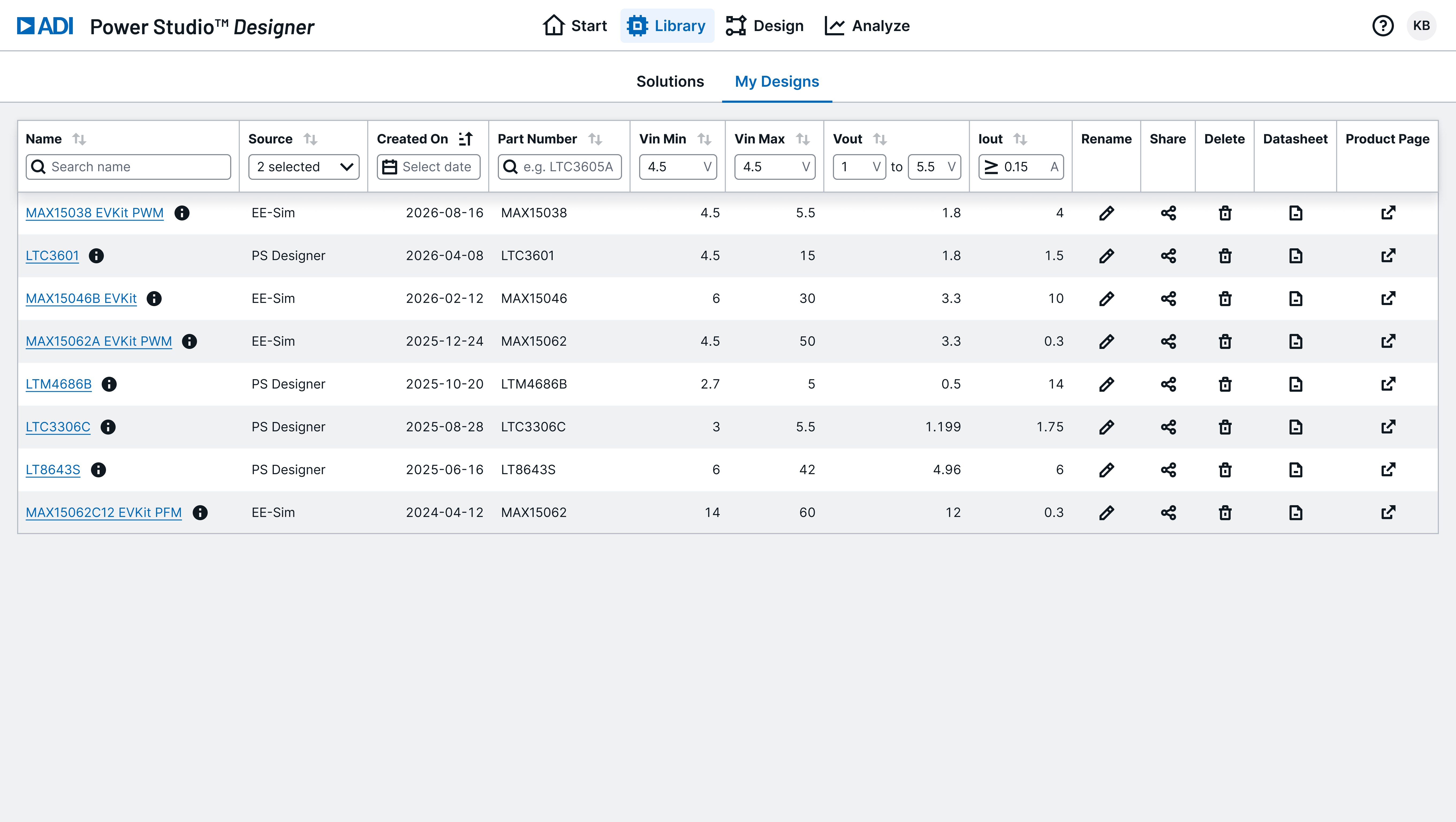
Imported Designs
If your design uses parts that are in the Power Studio Designer unified catalog, it has been imported and is fully editable — you can modify components, adjust requirements, run analysis, and export just like any other Power Studio Designer design.
Pending Designs
Power Studio Designer doesn't yet support every EE-Sim part. Designs that use a part we can't import yet appear in My Designs with a Pending status.
- Pending designs can't be opened, edited, or analyzed yet — they haven't been imported
- We're continuing to onboard parts and will eventually import all designs
- Need a Pending design sooner? Hover the Pending pill and click Request Import to open a Technical Support request to prioritize importing that design
No action is required — we'll import your Pending designs over time. Requesting import just helps us prioritize the ones that matter most to you.
Support / Configuration Components (Planned)
Power Studio Designer doesn't yet support editing of Support / Configuration components. These are components that configure the IC but don't affect loop response — things like BIAS capacitors, pullup resistors, SS capacitors, etc.
- For imported EE-Sim designs, the values and vendors for these components have been preserved
- This data will become accessible once support for Support / Configuration components is enabled
- No action is needed on your end — your data is preserved and will appear automatically when this feature is available
Same Account
You do not need a new account. Your existing ADI MyAnalog credentials work in Power Studio Designer. Corporate SSO (Azure AD) is also supported.
Can't Find a Design?
- Confirm you're signed in with the same MyAnalog account you used for EE-Sim
- Check Library > My Designs
- If a design uses a part we can't import yet, it will appear with a Pending status
- If a design still doesn't appear, contact Power Studio Designer Technical Support
Workflow Comparison
This page maps your EE-Sim workflows to their Power Studio Designer equivalents. The same tasks are all possible — some are even easier.
Finding a Part
EE-Sim: Solution Finder validates your requirements and ranks ICs by efficiency, size, and cost.
Power Studio Designer: The Library serves the same purpose.
- Navigate to the Library tab
- Enter your requirements: Vin (min/nom/max), Vout, Iout
- Filter by topology, integration type, function
- Use the Design Criteria sliders to filter by efficiency, BOM cost, and area
- Each solution card shows a schematic preview, efficiency percentage, and board area
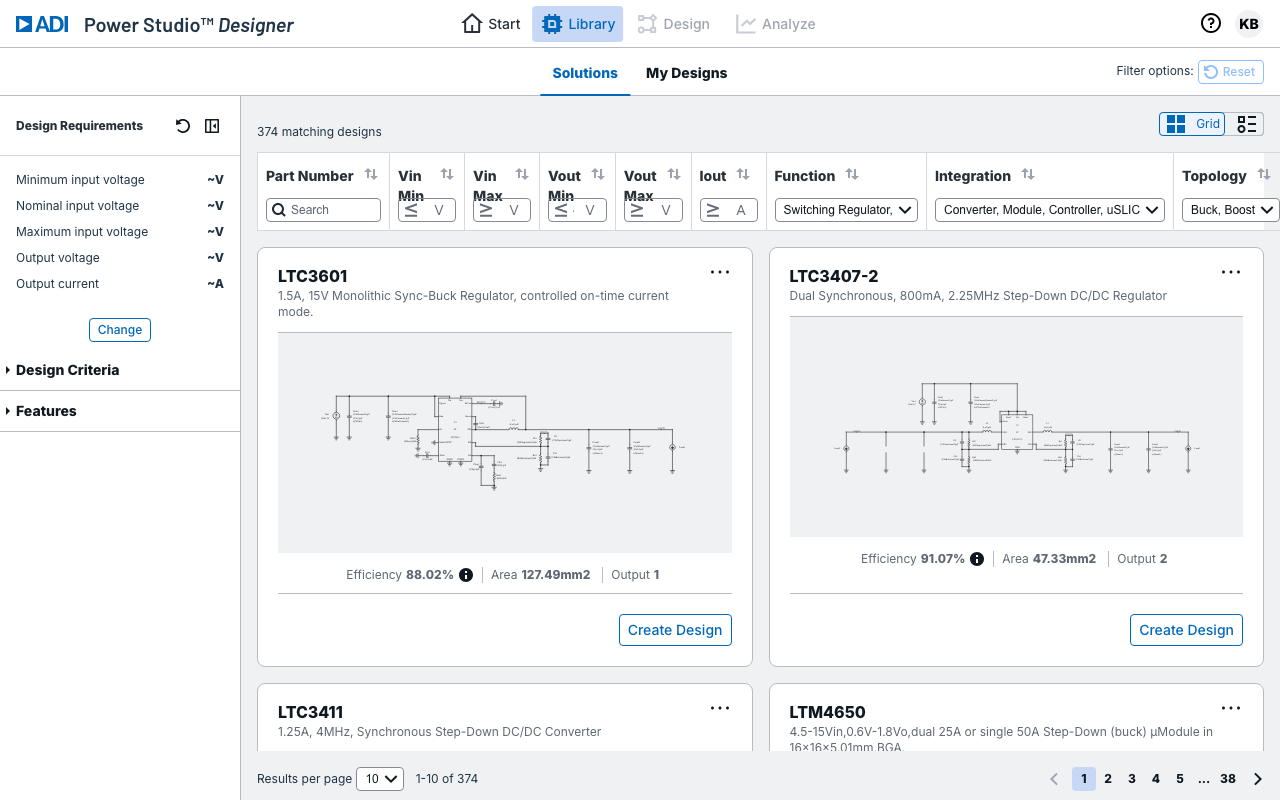
The library contains 374+ validated solutions across the unified Maxim and LT catalog. Results update as you adjust requirements. Toggle between grid and table views.
Creating a Design
EE-Sim: Enter Vin, Vout, Iout. Tool generates a single complete schematic with auto-selected components.
Power Studio Designer: The same requirements-driven workflow is available — enter your specs and Power Studio Designer generates a complete schematic with selected components. The difference is the engine and the result:
- A unified design engine — a hybrid of the EE-Sim and LTpowerCAD approaches — produces fast, accurate solutions
- Rather than a single result, Power Studio Designer generates multiple valid designs across acceptable parts, so you can compare options and pick the one that best fits your priorities
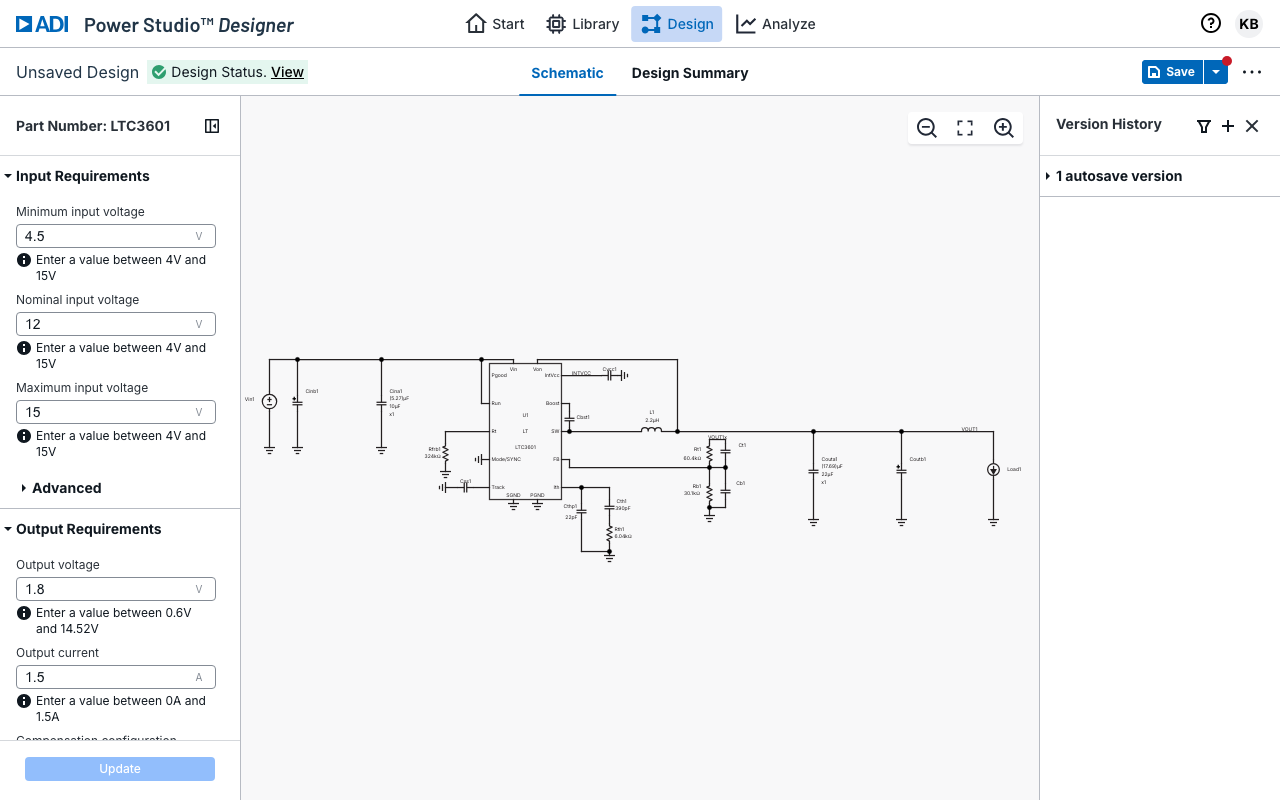
The Design Requirements sidebar (shown on the left) gives you full control:
- Input voltage (Minimum, Nominal, Maximum)
- Output voltage and current
- Voltage ripple targets
- Load transient parameters
- Switching frequency
- Ambient temperature
- Design priority (Balanced, Efficiency, or Size)
- BOM cost priority
Click Update to propagate changes. The schematic, component recommendations, and analysis results all update accordingly.
Working with the Schematic
EE-Sim: View schematic online (limited editing) or use OASIS desktop for full editing.
Power Studio Designer: The schematic editor is interactive and web-based:
- Full circuit visualization with all components, connections, and values
- Click any component to open its selection panel — browse alternatives filtered by your design's requirements
- Smart recommendations account for ripple current, saturation current, thermal limits, and package size
- Changes to components update performance metrics in real time
- Design Status indicator confirms your design is healthy and provides recommendations for design optimizations
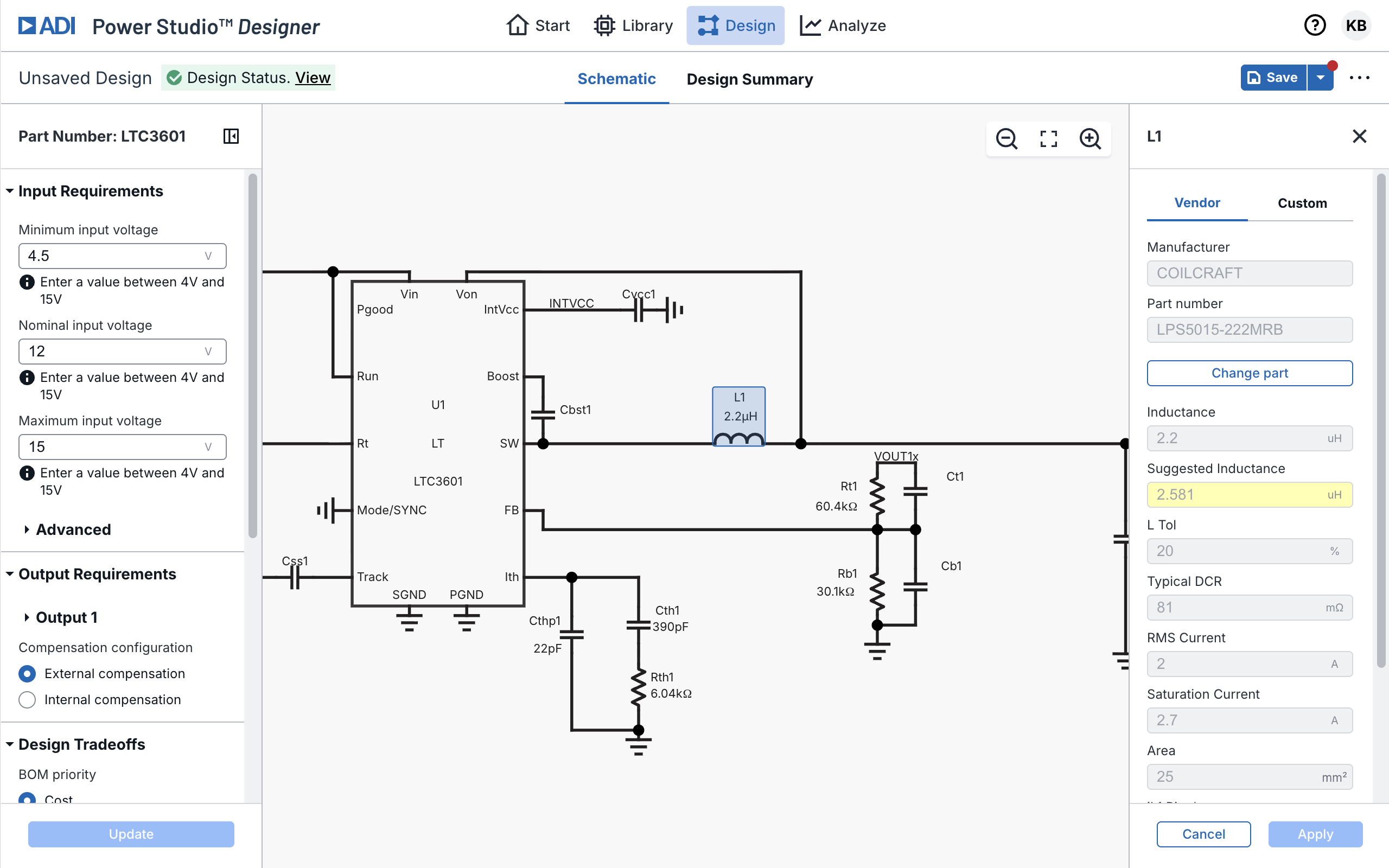
For advanced schematic editing (adding arbitrary components, wire routing, custom circuits), export to LTspice.
Analyzing Efficiency
EE-Sim: Run "Efficiency vs Load" simulation. View single efficiency curve. Wait for results.
Power Studio Designer: Navigate to Analyze > Efficiency and Loss. Results appear instantly — no simulation run required.
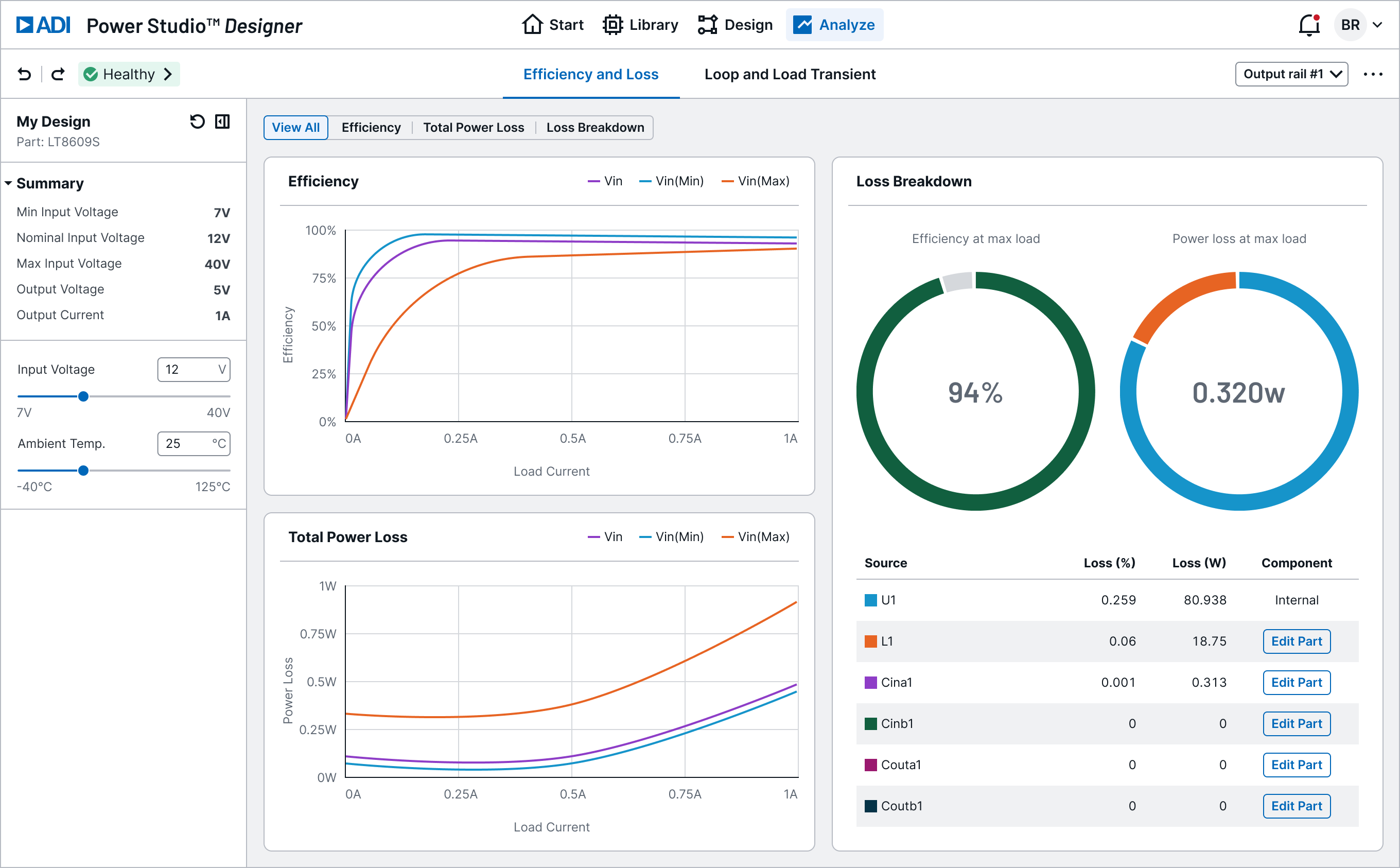
What you get:
- Efficiency vs Load chart — three curves plotted simultaneously for Vin(Min), Vin(Nominal), and Vin(Max)
- Total Power Loss vs Load chart — same three Vin variants
- Loss Breakdown panel — donut charts showing efficiency and loss at max load, plus a per-component loss table with an Edit part button for direct component swapping
- Parametric sliders — adjust input voltage or ambient temperature (-40°C to 125°C); charts update live
No need to re-run simulations for each operating condition.
Checking Loop Stability
EE-Sim: Run frequency domain simulation to generate Bode plot. Run load transient simulation for step response.
Power Studio Designer: Navigate to Analyze > Loop and Load Transient.
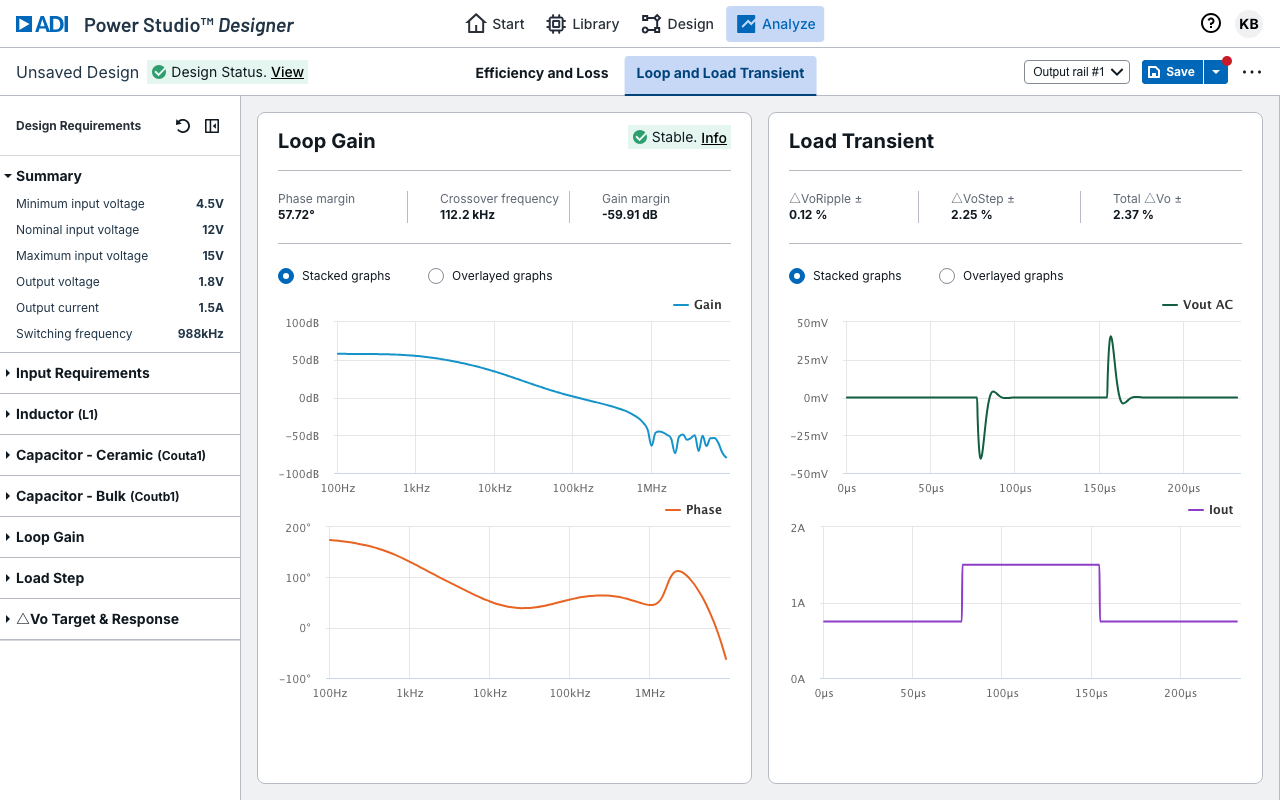
Bode plot:
- Gain (dB) and phase (degrees) vs frequency
- Phase margin, gain margin, and crossover frequency displayed
- info link shows detailed stability analysis
Load transient:
- Output voltage response to a load current step
- Overshoot, undershoot, and settling time visible
Load step parameters are configurable in the Design Requirements sidebar.
Exporting BOM
EE-Sim: Export Bill of Materials with manufacturer, part number, and quantity.
Power Studio Designer: Select Export > BOM from the design view. The exported BOM (CSV or Excel) includes:
| Field | Description |
|---|---|
| Reference | Component designator (L1, C1, R1) |
| Part Number | Manufacturer part number |
| Manufacturer | Component manufacturer |
| Value | Nominal value (4.7 uH, 22 uF) |
| Key Specs | Voltage rating, DCR, ESR, package |
| Quantity | Number required |
Note
Support / Configuration components are not yet supported in Power Studio Designer. For imported EE-Sim designs, this data has been preserved and will be included once support for these components is enabled.
Running Simulations
EE-Sim: Up to 6 simulation types run inline using SIMPLIS. Results appear in the Webscope waveform viewer.
Power Studio Designer takes a different approach:
Built-in analytical engine handles the most common analyses instantly:
- Steady-state efficiency and power loss
- Frequency domain (Bode plot, phase/gain margin)
- Load transient response
No simulation run needed — results compute on demand and update live when you change parameters.
For advanced simulation, export your design:
| Target | Best For | Advanced Analysis |
|---|---|---|
| LTspice | Offline simulation for LT and ADI parts | Startup transient, fault conditions, Monte Carlo, temperature sweeps, noise analysis |
| SIMPLIS/OASIS | Offline simulation for Maxim parts | Fast switching simulation with piecewise-linear models, periodic operating point, AC/loop analysis |
The export includes the complete netlist, component values, IC model, and suggested simulation configuration.
Note
Online simulation with LTspice and SIMPLIS directly in Power Studio Designer is a planned feature. Today, export your design to run these simulations offline.
Saving and Versioning
EE-Sim: Cloud-based save, track changes, compare design versions, share via link/email/team.
Power Studio Designer:
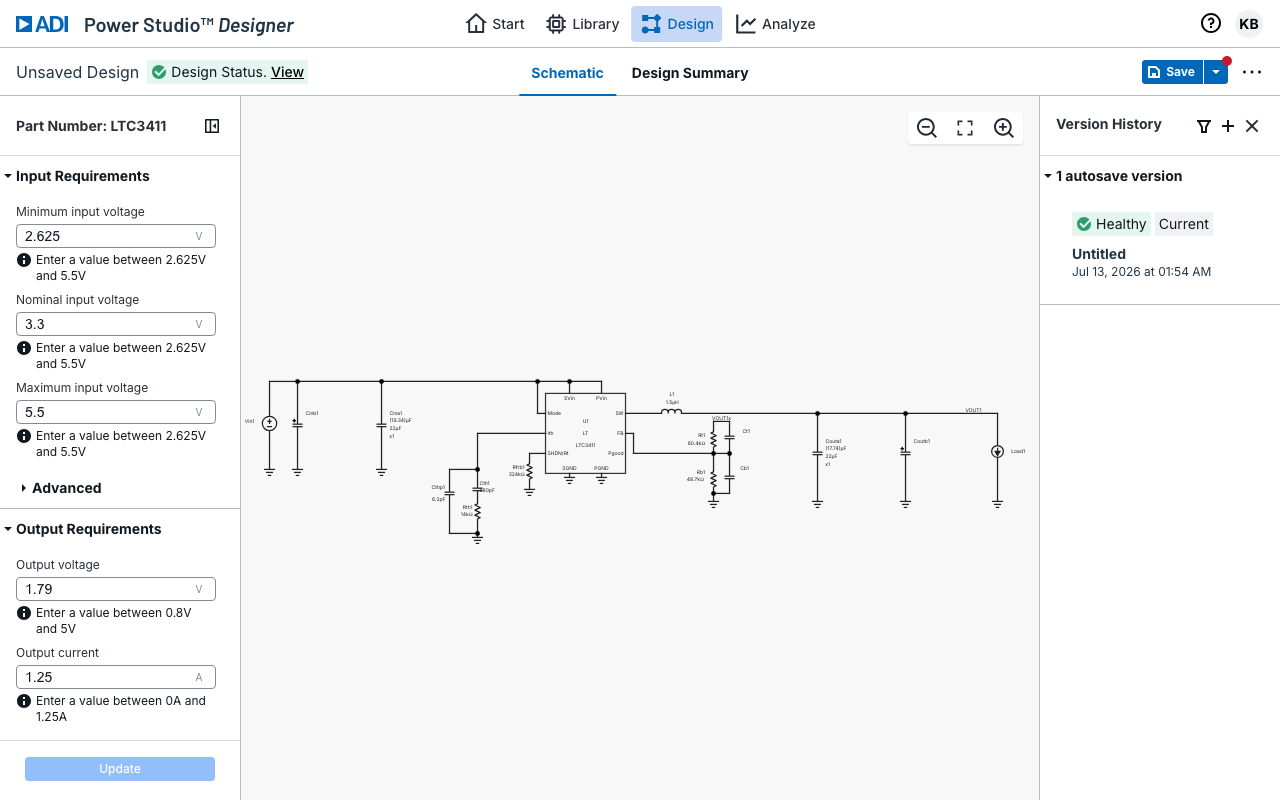
- Save — Save button with dropdown (Save, Save As)
- Version History — Panel showing saved versions with restore controls
- My Designs — Tab in the Library showing all your saved designs
- Sharing — Secure cloud-based sharing workflow rather than insecurely emailing designs
- Cloud Storage — Designs stored in secure, encrypted cloud storage
Summary
| Workflow | EE-Sim | Power Studio Designer |
|---|---|---|
| Find a part | Solution Finder | Library (374+ solutions) |
| Create design | Auto-generate from requirements | Generate multiple designs from requirements, choose best fit |
| Edit schematic | OASIS desktop or limited web | Interactive web editor |
| Analyze efficiency | Run simulation, wait | Instant results with parametric sliders |
| Check loop stability | Run Bode simulation | Built-in Bode + load transient |
| Export BOM | Export CSV | Export CSV/Excel |
| Advanced simulation | Online SIMPLIS | Export to LTspice or SIMPLIS/OASIS |
| Save/version | Cloud save + compare | Cloud save + save & restore version history |
Timeline
July 15, 2026 — EE-Sim Retired
- EE-Sim web application shut down
- All EE-Sim URLs redirect to Power Studio Designer
- Supported EE-Sim designs imported to Power Studio Designer (Library > My Designs); remaining designs marked Pending
- The OASIS desktop simulator continues to be available and maintained as part of ADI's power management tools portfolio
What This Means
- If you visit any EE-Sim URL, you will be redirected to Power Studio Designer
- Your supported designs are ready — sign in with your MyAnalog account and go to Library > My Designs
- No action required — supported designs were imported automatically
- Import is ongoing — designs we can't import yet appear as Pending. We're continuing to onboard parts and will eventually import all designs. You can request that a Pending design be prioritized
Frequently Asked Questions
Why is EE-Sim being retired?
EE-Sim is being retired for two reasons. First, ADI Power Studio Designer is our next-generation power design environment and the planned successor to EE-Sim. Second, EE-Sim is a third-party, vendor-hosted tool that has reached end-of-life, and the vendor's shutdown of the platform accelerated the transition timeline. Your existing designs have been preserved and are available in Power Studio Designer using the same MyAnalog account.
Where are my designs?
Power Studio Designer has imported the EE-Sim designs it currently supports. Sign in and go to Library > My Designs to find them. Designs that use parts we can't import yet appear as Pending — hover the Pending pill and click Request Import to ask us to prioritize importing one.
Do I need a new account?
No. Continue using the same MyAnalog account you used with EE-Sim. Corporate SSO (Azure AD) is also supported.
Are all EE-Sim parts supported?
Not yet. Power Studio Designer currently has 374+ solutions across the unified Maxim and LT catalog. Part support is being expanded on an ongoing basis, and additional parts will continue to be onboarded. If a design uses a part that isn't yet supported, it appears as Pending until we import it. You can hover the Pending pill and click Request Import to prioritize it.
What does a "Pending" design mean?
A Pending design is an EE-Sim design that Power Studio Designer can't import yet because it uses a part that isn't in the unified catalog. Pending designs appear in Library > My Designs but can't be opened, edited, or analyzed until they're imported. We're continuing to onboard parts and will eventually import all designs. To ask us to prioritize a specific design, hover its Pending pill and click Request Import, which opens a Technical Support request.
Why are my Support / Configuration components not populated (BIAS capacitors, pullup resistors, SS capacitors, etc.)?
Power Studio Designer doesn't yet support editing of Support / Configuration components — components that configure the IC but don't affect loop response, such as BIAS capacitors, pullup resistors, SS capacitors, etc. For imported EE-Sim designs, the values and vendors for these components have been preserved and will become accessible once these components are enabled. No action is needed on your end.
What if I can't find a design?
Confirm you're signed in with the same MyAnalog account used for EE-Sim and check Library > My Designs. If a design uses a part we can't import yet, it will appear as Pending. If a design still doesn't appear, contact Power Studio Designer Technical Support for help.
Why are my efficiency numbers different from EE-Sim?
Power Studio Designer uses real-time analytical calculations rather than a full circuit simulation for built-in results, so values may differ slightly from EE-Sim's SIMPLIS-based simulations. For exact correlation, export your design to LTspice or SIMPLIS and run a full simulation.
Can I run simulations online in Power Studio Designer?
Not yet. Power Studio Designer uses a built-in analytical engine for instant results (efficiency, loss, loop stability). For full circuit simulation today, export your design to LTspice or SIMPLIS. Online simulation with LTspice and SIMPLIS is a planned feature.
Why does Power Studio Designer look different?
Power Studio Designer is a modern, IC-level power design environment with guided workflows, component recommendations, and instant performance analysis. Some tasks are presented differently than in EE-Sim — watch the Getting Started video for a quick tour, or see the Workflow Comparison for a detailed mapping.
Can I still use OASIS?
Yes. The OASIS desktop simulator continues to be available for offline simulation workflows and will be maintained as part of ADI's power management tools portfolio. You can also export designs from Power Studio Designer directly to SIMPLIS format.
What about bench measurement correlation?
EE-Sim's OASIS could import bench data and overlay it on simulation results. Power Studio Designer does not have this capability. Use LTspice alongside your bench equipment for manual correlation.
Where do I get help?
- Power Studio Designer — Launch the tool
- Getting Started video — Quick tour of the tool
- ADI EngineerZone — Community forum
- ADI Technical Support — Contact support
Support
Getting Help
Former EE-Sim users are now supported as Power Studio Designer users. Use the resources below for any questions about the transition or the tool itself.
Resources
| Resource | Link |
|---|---|
| Power Studio Designer | powerstudiodesigner.app.analog.com |
| Getting Started Video | Watch the tour — Quick introduction to Power Studio Designer |
| Power Studio Designer Technical Support | Contact support — Get help from the Power Studio Designer team |
| Power Studio Designer Feedback | Send feedback — Share suggestions or report an issue |
| ADI EngineerZone | ez.analog.com/power-studio-designer — Community forum |
| ADI Technical Support | analog.com/support |
| LTspice | Download — Free offline simulator |
| SIMPLIS Models | Download — Ready-to-run schematics |
| Power Management Tools | Overview — Full tool ecosystem |
Common Requests
See the FAQ for answers to common transition questions.
Release Notes
Release Notes
Release notes for this EE-Sim Migration Guide site.
v0.2.7 — July 15, 2026
- Added links to the Power Studio Designer Getting Started video (launches via
support=learn) - Front page: video callout, Quick Start step, and Next Steps link
- Also linked from the Support resources and FAQ
v0.2.6 — July 14, 2026
- Updated the design migration model: supported designs are imported and fully editable; designs that can't be imported yet appear as Pending
- Removed the previous read-only download description (design info, BOM, SIMPLIS schematic) for unsupported designs
- Documented the Request Import action (via the Pending pill) to prioritize importing a specific design
- New FAQ: "What does a 'Pending' design mean?"
- Terminology updated from "migrated" to "imported" throughout
v0.2.5 — July 14, 2026
- Clarified the "Creating a Design" comparison — Power Studio Designer offers the same requirements-driven workflow, with a unified design engine that generates multiple valid designs to choose from
- Updated home page and workflow summary to reflect multiple design options
v0.2.4 — July 14, 2026
- Incorporated PSD team feedback across content pages
- Added per-engine advanced analysis detail to the simulation export table (LTspice, SIMPLIS/OASIS)
- Clarified that online simulation with LTspice and SIMPLIS is a planned feature
- Added Power Studio Designer Technical Support and Feedback links
- Support page now links to the FAQ for common requests
- Unified versioning wording ("save & restore version history")
- Silver border added to all screenshots for visual separation
- Documentation (README) refreshed with hosted URLs and current page list
v0.2.3 — July 14, 2026
- Content accuracy updates across all pages
- Updated At a Glance comparison table (unified platform, design entry, offline simulation)
- Restructured Quick Start with sub-bullets
- New component editing screenshot (Design tab with L1 selection panel)
- Updated EngineerZone links to Power Studio Designer forum
- External links open in new tab
v0.2.2 — July 14, 2026
- Complete content rebuild from PSD docs team reference materials
- New "Your Designs" page — explains design migration and read-only access for unsupported parts
- New "Workflow Comparison" page — side-by-side EE-Sim vs Power Studio Designer for all key tasks
- Updated home page with "Why is EE-Sim being retired?", At a Glance comparison, What's Improved
- Updated FAQ with accurate answers
- 9 new Power Studio Designer screenshots
- Accuracy fixes across all pages
v0.2.1 — July 2026
- EE-Sim sunset site launched (July 15, 2026)
- Initial migration documentation published
- Redirect service active at
go.eesim.app.analog.com